pooltool.objects
Simulation object classes.
The three main simulation objects are pooltool.objects.Ball,
pooltool.objects.Cue, and
pooltool.objects.Table, however there are many more objects
that either help create the primary objects or comprise the primary objects. Those are
all kept in this module.
Classes
- class Ball(id: str, state: BallState = BallState.default, params: BallParams = BallParams.default, ballset: BallSet | None = None, initial_orientation: BallOrientation = BallOrientation.random, history: BallHistory = BallHistory.factory, history_cts: BallHistory = BallHistory.factory)[source]
A billiards ball.
This class represents a billiards ball. It stores its parameters (mass, radius, etc.), it’s state (coordinates, velocity, spin, etc), its history (a time-resolved trajectory of its state), amongst other things.
Attributes:
- state : BallState
The ball’s state.
This is the current state of the ball.
See also
See the Important section below for a description of the role of
statesduring simulation.
- params : BallParams
The ball’s physical parameters.
The physical parameters of the ball.
- ballset : BallSet | None
The ball set that the ball belongs to.
Important if rendering the ball in a scene.
See also
See
set_ballset()for details
- initial_orientation : BallOrientation
The initial rendered orientation of the ball.
Important if rendering the ball in a scene.
This is the orientation of the ball at \(t = 0\).
- history : BallHistory
The ball’s state history
The historical states of the ball from \(t_{initial}\) to \(t_{final}\).
See also
See the Important section below for a description of the role of
historyduring simulation.
- history_cts : BallHistory
The ball’s continuous state history
The historical states of the ball from \(t_{initial}\) to \(t_{final}\) densely sampled with respect to time.
See also
See
pooltool.evolution.continuize()for a details about continuizing a simulated system.See the Important section below for a description of the role of
history_ctsduring simulation.
Important
To instantiate this class, consider using the
create()constructor. Or, use functions withinpooltool.layoutsto generate entire collection of balls. Or, of course, construct as normal with__init__.Important
The following explains how a
Ballobject is modified when its parent system is simulated (pooltool.evolution.simulate()).At the start of the simulation process,
staterepresents the ball state at \(t = 0\). A copy ofstateis appended tohistory.For each timestep of the simulation,
stateis used to inform how the system should advance forward in time. Once determined,stateis updated to reflect the ball’s new state. A copy ofstateis appended tohistory.When the simulation is finished,
staterepresents the final resting state of the ball. So too doeshistory[-1].Finally, if the system is continuized (see
pooltool.evolution.continuize()),history_ctsis populated. Otherwise it remains empty.- property xyz
The displacement (from origin) vector of the ball.
A shortcut for
self.state.rvw[0].
- property vel
The velocity vector of the ball.
A shortcut for
self.state.rvw[1].
- property avel
The angular velocity vector of the ball.
A shortcut for
self.state.rvw[2].
Methods:
- set_ballset(ballset: BallSet) None[source]
Update the ballset
- Raises:
ValueError -- If the ball ID doesn’t match to a model name of the ballset.
See also
See
pooltool.objects.BallSetfor details about ball sets.See
pooltool.system.System.set_ballset()for setting the ballset for all the balls in a system.
- copy(drop_history: bool = False) Ball[source]
Create a copy
- Parameters:
drop_history : bool
If True, the returned copy
historyandhistory_ctsattributes are both set to emptypooltool.objects.BallHistoryobjects.- Return type:
- static create(id: str, *, xy: Sequence[float] | None = None, ballset: BallSet | None = None, **kwargs) Ball[source]
Create a ball using keyword arguments.
This constructor flattens the tunable parameter space, allowing one to construct a
Ballwithout directly instancing objects like likepooltool.objects.BallParamsandpooltool.objects.BallState.
- class BallHistory(states: list[BallState] = list)[source]
A container of BallState objects
Attributes:
Methods:
- add(state: BallState) None[source]
Append a state to the history
- Raises:
AssertionError -- If
state.t < self.states[-1]
Notes
This appends
statetostatesstateis not copied before appending to the history, so they share the same memory address.
- copy() BallHistory[source]
Create a copy
- Return type:
- vectorize() tuple[NDArray[float64], NDArray[float64], NDArray[float64]][source]
Compile the attribute from each ball state into arrays
This method unzips each
pooltool.objects.BallStateinstates, resulting in an array ofpooltool.objects.BallState.rvwvalues, an array ofpooltool.objects.BallState.svalues, and an array ofpooltool.objects.BallState.tvalues.The vectors have the following properties:
>>> import pooltool as pt
>>> history = pt.simulate(pt.System.example(), continuous=True).balls["cue"].history_cts
>>> rvws, ss, ts = history.vectorize()
>>> # Their lengths are equal to the BallHistory
>>> len(rvws) == len(ss) == len(ts) == len(history)
True
>>> # The indices of the arrays match the values of the history
>>> pt.objects.BallState(rvws[26], ss[26], ts[26]) == history[26]
True
- Returns:
A length 3 tuple (
rvws,ssandts).- Raises:
ValueError -- If the history is empty.
- Return type:
Example
vectorizecan be useful for plotting trajectories.import pooltool as pt import matplotlib.pyplot as plt system = pt.System.example() pt.simulate(system, continuous=True, inplace=True) for ball in system.balls.values(): rvw, ss, ts = ball.history_cts.vectorize() plt.plot(rvw[:, 0, 0], rvw[:, 0, 1], color=ss) plt.show()
See also
- static from_vectorization(vectorization: tuple[NDArray[float64], NDArray[float64], NDArray[float64]] | None) BallHistory[source]
Zips a vectorization into a BallHistory
An inverse method of
vectorize().- Returns:
A BallHistory constructed from the input vectors.
- Return type:
Example
This illustrates a round-trip with
vectorize()andfrom_vectorization().First create history
>>> import pooltool as pt
>>> history = pt.simulate(pt.System.example(), continuous=True).balls["cue"].history_cts
Illustrate a lossless round trip:
>>> pt.objects.BallHistory.from_vectorization(history.vectorize()) == history
True
See also
- static factory() BallHistory[source]
- Return type:
- class BallOrientation(pos: tuple[float, float, float, float], sphere: tuple[float, float, float, float])[source]
Stores a ball’s rendered BallOrientation
From a practical standpoint, what needs to be understood about this class is that its attributes uniquely specify a ball’s rendered orientation. Less practically, but more specifically, these attributes correspond to the nodes, ‘pos’ and ‘sphere’, that make up a ball’s visual rendering.
Attributes:
Methods:
- static random() BallOrientation[source]
Generate a random BallOrientation
This generates a ball orientation from a uniform sampling of possible orientations.
- Returns:
A randomized ball orientation.
- Return type:
- copy() BallOrientation[source]
Create a copy
Note
Since the class is frozen and its attributes are immutable, this just returns
self.
- Return type:
- class BallState(rvw: ndarray[tuple[int, ...], dtype[float64]], s, t=0)[source]
Holds a ball’s state
The ball’s state is defined (1) the kinematic state of the ball, (2) a label specifying the ball’s motion state, and (3) the point in time that the ball exists in.
Attributes:
- rvw : ndarray[tuple[int, ...], dtype[float64]]
The kinematic state of the ball.
rvwis a \(3\times3\) matrix that stores the 3 vectors that characterize a ball’s kinematic state:\(r\): The displacement (from origin) vector (accessed with
rvw[0])\(v\): The velocity vector (accessed with
rvw[1])\(w\): The angular velocity vector (accessed with
rvw[2])
- s : int
The motion state label of the ball.
sis an integer corresponding to the following motion state labels:0 = stationary 1 = spinning 2 = sliding 3 = rolling 4 = pocketed
Methods:
- class BallParams(m: float = 0.170097, R: float = 0.028575, u_s: float = 0.2, u_r: float = 0.01, u_sp_proportionality: float = 0.4444444444444444, u_b: float = 0.05, e_b: float = 0.95, e_c: float = 0.85, f_c: float = 0.2, g: float = 9.81)[source]
Ball parameters and physical constants
Note
The presence of an attribute does not guarantee its usage by the physics engine. For example, if the frictionless elastic ball-ball collision model is used, then \(u_b\), the ball-ball sliding coefficient of friction, will have no affect on the simulation.
Attributes:
- u_sp_proportionality : float
The spinning coefficient of friction, with \(R\) factored out.
See also
For the coefficient of spinning friction, use the property
u_sp().
- e_c : float
The cushion coefficient of restitution.
Note
This is a potentially model-dependent ball-cushion parameter and should be placed elsewhere, either as a model parameter or as a cushion segment parameter.
- f_c : float
The cushion coefficient of friction.
Note
This is a potentially model-dependent ball-cushion parameter and should be placed elsewhere, either as a model parameter or as a cushion segment parameter.
Most of the default values (SI units) are taken from or based off of https://billiards.colostate.edu/faq/physics/physical-properties/.
Some of the parameters aren’t truly ball parameters, e.g. the gravitational constant. However, it is nice to be able to tune such parameters on a ball-by-ball basis, so they are included here.
- property u_sp: float[source]
Coefficient of spinning friction.
This is equal to
u_sp_proportionality*R.- Return type:
Methods:
- copy() BallParams[source]
Return a copy
Note
Since the class is frozen and its attributes are immutable, this just returns
self.
- Return type:
- classmethod default(game_type: GameType = GameType.EIGHTBALL) BallParams[source]
Return prebuilt ball parameters based on game type
- Parameters:
game_type : GameType
What type of game is being played?
- Returns:
The prebuilt ball parameters associated with the passed game type.
- Return type:
- classmethod prebuilt(name: PrebuiltBallParams) BallParams[source]
Return prebuilt ball parameters based on name
- Parameters:
name : PrebuiltBallParams
A
pooltool.objects.PrebuiltBallParamsmember.- Return type:
All prebuilt ball parameters are are members of the
pooltool.objects.PrebuiltBallParamsEnum. This constructor takes a prebuilt name and returns the corresponding ball parameters.See also
- class PrebuiltBallParams[source]
An Enum specifying prebuilt ball parameters.
Base Classes:
pooltool.utils.strenum.StrEnumAttributes:
- POOL_GENERIC
- SNOOKER_GENERIC
- BILLIARD_GENERIC
- class BallSet(name: str)[source]
A ballset.
What is a ballset?
A ballset specifies the set that a ball belongs to.
Why is it important?
Ballsets are important for properly rendering balls in a scene. By specifying a ballset for a ball, you declare the visual texture / skin that the ball should be wrapped in. If a ball’s ballset is not declared, it will be rendered with the default skin.
What ballsets are available?
See
pooltool.objects.get_ballset_names().Where are ballsets stored?
Each ballset is represented as a subdirectory within the following directory:
$ echo $(python -c "import pooltool; print(pooltool.__file__[:-12])")/models/balls
Each ball model is a
.glbfile. Its base name represents the model’s ID, and matching ball IDs will be textured by this model. To associate multiple ball IDs to the same model, aconversion.jsonfile is used. For example, see how thegeneric_snookerballset matches the red ball IDs to the same model ID:$ cat $(python -c "import pooltool; print(pooltool.__file__[:-12])")/models/balls/generic_snooker/conversion.json { "red_01": "red", "red_02": "red", "red_03": "red", "red_04": "red", "red_05": "red", "red_06": "red", "red_07": "red", "red_08": "red", "red_09": "red", "red_10": "red", "red_11": "red", "red_12": "red", "red_13": "red", "red_14": "red", "red_15": "red" }Attributes:
- name : str
The name of the ballset.
During instantiation, the validity of this name will be checked, and a ValueError will be raised if the ballset doesn’t exist.
- property path: Path
The path of the ballset directory
This directory holds the ball models.
- Return type:
Methods:
- class Cue(id: str = 'cue_stick', V0: float = 2.0, phi: float = 0.0, theta: float = 0.0, a: float = 0.0, b: float = 0.25, cue_ball_id: str = 'cue', specs: CueSpecs = CueSpecs.default)[source]
A cue stick.
Attributes:
- V0 : float
The impact speed.
Units are m/s.
Note
This is the speed of the cue stick upon impact, not the speed of the ball upon impact.
- phi : float
The directional strike angle.
The horizontal direction of the cue’s orientation relative to the table layout. Specified in degrees.
If you imagine facing from the head rail (where the cue is positioned for a break shot) towards the foot rail (where the balls are racked),
\(\phi = 0\) corresponds to striking the cue ball to the right
\(\phi = 90\) corresponds to striking the cue ball towards the foot rail
\(\phi = 180\) corresponds to striking the cue ball to the left
\(\phi = 270\) corresponds to striking the cue ball towards the head rail
\(\phi = 360\) corresponds to striking the cue ball to the right
- theta : float
The cue inclination angle.
The vertical angle of the cue stick relative to the table surface. Specified in degrees.
\(\theta = 0\) corresponds to striking the cue ball parallel with the table (no massé)
\(\theta = 90\) corresponds to striking the cue ball downwards into the table (max massé)
- a : float
The amount and direction of side spin.
\(a = -1\) is the rightmost side of ball
\(a = +1\) is the leftmost side of the ball
- b : float
The amount of top/bottom spin.
\(b = -1\) is the bottom-most side of the ball
\(b = +1\) is the top-most side of the ball
Methods:
- copy() Cue[source]
Create a copy
Note
specsis shared betweenselfand the copy, but that’s ok because it’s frozen and has no mutable attributes.- Return type:
- set_state(V0: float | None = None, phi: float | None = None, theta: float | None = None, a: float | None = None, b: float | None = None, cue_ball_id: str | None = None) None[source]
Set the cueing parameters
- Parameters:
If any arguments are
None, they will be left untouched--they will not be set to None.
- class CueSpecs(brand: str = 'Predator', M: float = 0.567, length: float = 1.4732, tip_radius: float = 0.0106045, shaft_radius_at_tip: float = 0.0065, shaft_radius_at_butt: float = 0.02, end_mass: float = 0.0056699)[source]
Cue stick specifications.
All units are SI.
Attributes:
- end_mass : float
The mass of the of the cue’s end. This controls the amount of deflection (squirt) that occurs when using sidespin. Lower means less deflection. It is defined here: https://billiards.colostate.edu/technical_proofs/new/TP_A-31.pdf.
Methods:
- class TableName[source]
An Enum specifying table names.
Base Classes:
pooltool.utils.strenum.StrEnumAttributes:
- SEVEN_FOOT_SHOWOOD
- SNOOKER_GENERIC
- BILLIARD_WIP
- SUMTOTHREE_WIP
- class CircularCushionSegment(id: str, center: ndarray[tuple[int, ...], dtype[float64]], radius: float)[source]
A circular cushion segment defined by a circle center and radius
Attributes:
- center : ndarray[tuple[int, ...], dtype[float64]]
A length-3 array specifying the circular cushion’s center.
center[0],center[1], andcenter[2]are the x-, y-, and z-coordinates of the cushion’s center. The circle is assumed to be parallel to the XY plane, which makescenter[2]is the height of the cushion.
Methods:
- get_normal_xy(xyz: NDArray[float64]) NDArray[float64][source]
Calculates the normal vector for a ball contacting the cushion
Assumes that the ball is in fact in contact with the cushion.
- get_normal_3d(xyz: NDArray[float64]) NDArray[float64][source]
Calculates the 3D normal vector for a point contacting the cushion.
- copy() CircularCushionSegment[source]
Create a copy
- Return type:
- static dummy() CircularCushionSegment[source]
- Return type:
- class CushionDirection[source]
An Enum for the direction of a cushion
Important for constructing cushions if simulation performance speed is required.
For most table geometries, the playing surface only exists on one side of the cushion, so collisions only need to be checked for one direction. This direction can be specified with this class’s attributes.
Attributes:
- SIDE1
Use side 1.
- SIDE2
Use side 2.
- BOTH
Use sides 1 and 2.
Unfortunately, the rule governing whether to use
SIDE1orSIDE2is not clear and instead requires experimentation.If
BOTHis used, both collision checks are performed which makes collision checks twice as slow.Note
This used to inherit from
Enum, but accessing the cushion direction inget_next_ball_linear_cushion_collisiontook up 20% of the function’s runtime, so it was removed.
- class CushionSegments(linear: dict[str, LinearCushionSegment], circular: dict[str, CircularCushionSegment])[source]
A collection of cushion segments
Cushion segments can be either linear (see
pooltool.objects.LinearCushionSegment) or circular (seepooltool.objects.CircularCushionSegment). This class stores both.Attributes:
- linear : dict[str, LinearCushionSegment]
A dictionary of linear cushion segments.
Warning
Keys must match the value IDs, e.g.
{"2":
LinearCushionSegment(id="2", ...)}
- circular : dict[str, CircularCushionSegment]
A dictionary of circular cushion segments.
Warning
Keys must match the value IDs, e.g.
{"2t":
CircularCushionSegment(id="2t", ...)}
Methods:
- copy() CushionSegments[source]
Create a copy
- Return type:
- class LinearCushionSegment(id: str, p1: ndarray[tuple[int, ...], dtype[float64]], p2: ndarray[tuple[int, ...], dtype[float64]], direction: int = 2)[source]
A linear cushion segment defined by the line between points \(p_1\) and \(p_2\).
Attributes:
- p1 : ndarray[tuple[int, ...], dtype[float64]]
The 3D coordinate where the cushion segment starts.
Note
p1andp2must share the same height (p1[2] == p2[2]).
- p2 : ndarray[tuple[int, ...], dtype[float64]]
The 3D coordinate where the cushion segment ends.
Note
p1andp2must share the same height (p1[2] == p2[2]).
- direction : int
The cushion direction (default =
pooltool.objects.CushionDirection.BOTH).See
pooltool.objects.CushionDirectionfor explanation.
- property lx: float[source]
The x-coefficient (\(l_x\)) of the cushion’s 2D general form line equation.
The cushion’s general form line equation in the \(XY\) plane (i.e. dismissing the z-component) is
\[l_x x + l_y y + l_0 = 0\]where
\[\begin{split}\begin{align*} l_x &= -\frac{p_{2y} - p_{1y}}{p_{2x} - p_{1x}} \\ l_y &= 1 \\ l_0 &= \frac{p_{2y} - p_{1y}}{p_{2x} - p_{1x}} p_{1x} - p_{1y} \\ \end{align*}\end{split}\]- Return type:
- property ly: float[source]
The x-coefficient (\(l_y\)) of the cushion’s 2D general form line equation.
See
lx()for definition.- Return type:
- property l0: float[source]
The constant term (\(l_0\)) of the cushion’s 2D general form line equation.
See
lx()for definition.- Return type:
- property normal: NDArray[float64][source]
The line’s normal vector, with the z-component zeroed prior to normalization.
Warning
The returned normal vector is arbitrarily directed, meaning it may point away from the table surface, rather than towards it. This nonideality is properly handled in downstream simulation logic, however if you’re using this method for custom purposes, you may want to reverse the direction of this vector by negating it.
Methods:
- get_normal_xy(xyz: NDArray[float64]) NDArray[float64][source]
Calculates the normal vector for a ball contacting the cushion.
Warning
The returned normal vector is arbitrarily directed, meaning it may point away from the table surface, rather than towards it. This nonideality is properly handled in downstream simulation logic, however if you’re using this method for custom purposes, you may want to reverse the direction of this vector by negating it.
- Parameters:
-
The position of the ball.
See
xyzproperty ofpooltool.objects.BallState. - Returns:
The line’s normal vector, with the z-component zeroed prior to normalization.
- Return type:
NDArray[np.float64]
Note
This method only exists for call signature parity with
pooltool.objects.CircularCushionSegment.get_normal_xy(). Consider usingnormal()instead.
- get_normal_3d(xyz: NDArray[float64]) NDArray[float64][source]
Calculates the 3D normal vector for a point contacting the cushion.
This method computes the normal by finding the component of the vector from
p1to the contact point that is perpendicular to the cushion’sunit_axis. Mathematically, this is achieved by subtracting the projection of the position vector onto the cushion’s axis from the position vector itself, yielding the perpendicular component which defines the normal direction.Warning
The returned normal vector is arbitrarily directed, meaning it may point away from the table surface, rather than towards it. This nonideality is properly handled in downstream simulation logic, however if you’re using this method for custom purposes, you may want to reverse the direction of this vector by negating it.
- copy() LinearCushionSegment[source]
Create a copy
- Return type:
- static dummy() LinearCushionSegment[source]
- Return type:
- class Pocket(id: str, center: ndarray[tuple[int, ...], dtype[float64]], radius: float, depth: float = 0.08, contains: set = set)[source]
A circular pocket
Attributes:
- center : ndarray[tuple[int, ...], dtype[float64]]
A length-3 array specifying the pocket’s position.
center[0]is the x-coordinate of the pocket’s centercenter[1]is the y-coordinate of the pocket’s centercenter[2]must be 0.0
Methods:
- class Table(cushion_segments: CushionSegments, pockets: dict[str, Pocket], table_type: TableType, model_descr: TableModelDescr | None = None, height: float = 0.708, lights_height: float = 1.99)[source]
A table.
While a table can be constructed by passing all of the following initialization parameters, there are many easier ways, all of which are detailed in the Table Specification </resources/table_specs> resource.
Attributes:
- cushion_segments : CushionSegments
The table’s linear and circular cushion segments.
- height : float
The height of the playing surface (measured from the ground).
This is just used for visualization.
- lights_height : float
The height of the table lights (measured from the playing surface).
This is just used for visualization.
- property w: float
The width of the table.
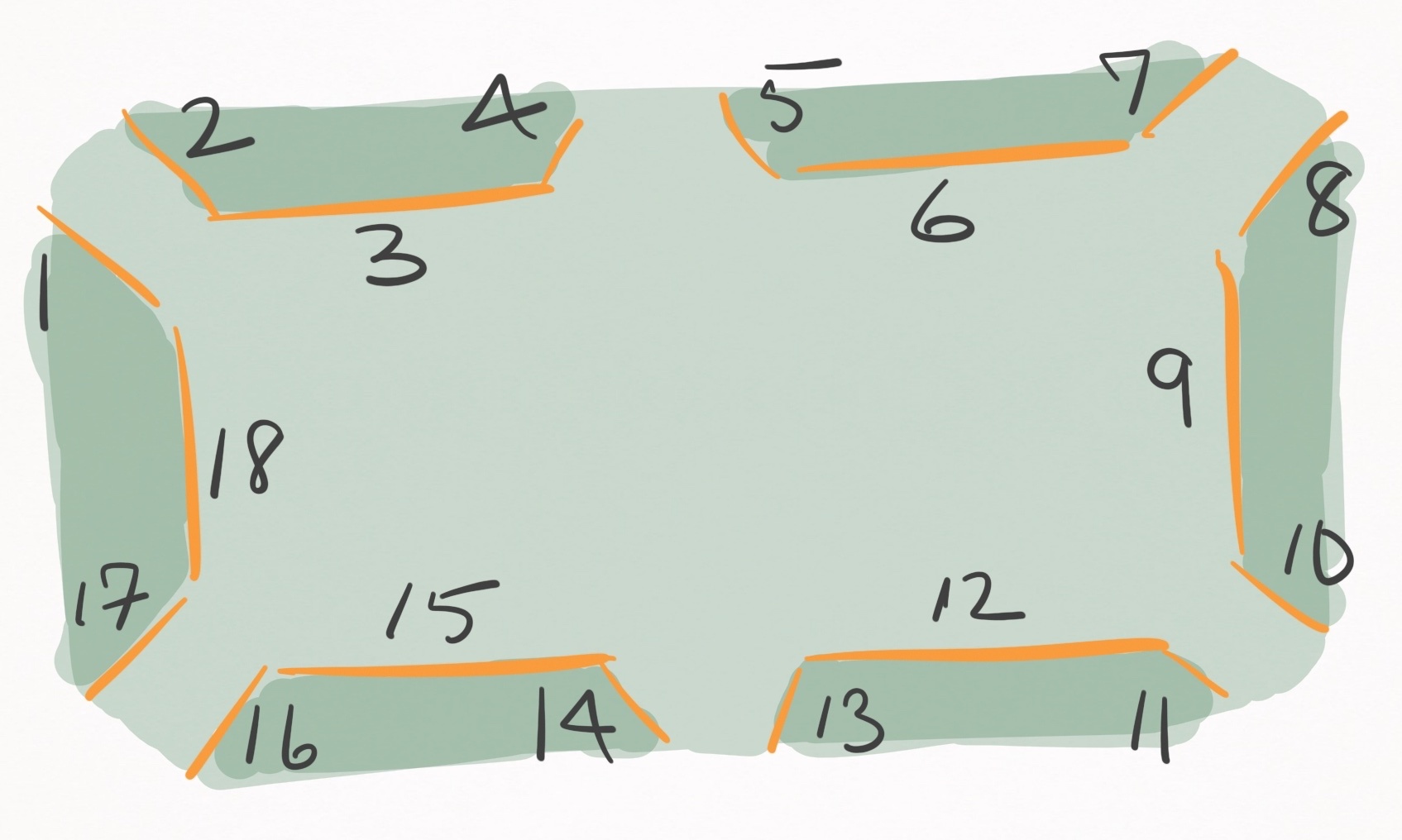
Warning
This assumes the table follows the layout similar to this diagram. Specifically, it must have the linear cushion segments with IDs
"3"`and"12".- Return type:
- property l: float
The length of the table.
Warning
This assumes the table follows the layout similar to this diagram. Specifically, it must have the linear cushion segments with IDs
"9"`and"18".- Return type:
Methods:
- set_cushion_height(height: float) None[source]
Set the height of all cushion segments.
- Parameters:
height : float
The new height to set for all cushion segments.
- static from_table_specs(specs: pooltool.objects.table.specs.TableSpecs) Table[source]
Build a table from a table specifications object
- Parameters:
specs : pooltool.objects.table.specs.TableSpecs
A valid table specification.
- Returns:
A table matching the specifications of the input.
pooltool.objects.PocketTableSpecshastable_typeset to pooltool.objects.TableType.POCKETpooltool.objects.BilliardTableSpecshastable_typeset to pooltool.objects.TableType.BILLIARDpooltool.objects.SnookerTableSpecshastable_typeset to pooltool.objects.TableType.SNOOKER
- Return type:
- class BilliardTableSpecs(l: float = 2.84, w: float = 1.42, cushion_width: float = 0.0508, cushion_height: float = 0.037, height: float = 0.708, lights_height: float = 1.99, model_descr: TableModelDescr = TableModelDescr.null)[source]
Parameter specifications for a billiards (pocketless) table.
See also
See the Table Specification resource for visualizations and descriptions of each attribute.
See
pooltool.objects.PocketTableSpecsfor billiard table specs.See
pooltool.objects.SnookerTableSpecsfor snooker table specs.
- class PocketTableSpecs(l: float = 1.9812, w: float = 0.9906, cushion_width: float = 0.0508, cushion_height: float = 0.036576, corner_pocket_width: float = 0.118, corner_pocket_angle: float = 5.3, corner_pocket_depth: float = 0.0417, corner_pocket_radius: float = 0.062, corner_jaw_radius: float = 0.02095, side_pocket_width: float = 0.137, side_pocket_angle: float = 7.14, side_pocket_depth: float = 0.0685, side_pocket_radius: float = 0.0645, side_jaw_radius: float = 0.00795, height: float = 0.708, lights_height: float = 1.99, model_descr: TableModelDescr = TableModelDescr.null)[source]
Parameter specifications for a pocket table.
See also
See the Table Specification resource for visualizations and descriptions of each attribute.
See
pooltool.objects.BilliardTableSpecsfor billiard table specs.See
pooltool.objects.SnookerTableSpecsfor snooker table specs.
Default parameters match
pooltool.objects.TableName.SEVEN_FOOT_SHOWOOD.
- class SnookerTableSpecs(l: float = 3.5445, w: float = 1.7465, cushion_width: float = 0.039369999999999995, cushion_height: float = 0.028, corner_pocket_width: float = 0.083, corner_pocket_angle: float = 0, corner_pocket_depth: float = 0.036, corner_pocket_radius: float = 0.1016, corner_jaw_radius: float = 0.1016, side_pocket_width: float = 0.087, side_pocket_angle: float = 0, side_pocket_depth: float = 0.02413, side_pocket_radius: float = 0.042671999999999995, side_jaw_radius: float = 0.0635, height: float = 0.708, lights_height: float = 1.99, model_descr: TableModelDescr = TableModelDescr.null)[source]
Parameter specifications for a snooker table.
See also
See the Table Specification resource for visualizations and descriptions of each attribute.
See
pooltool.objects.BilliardTableSpecsfor billiard table specs.See
pooltool.objects.PocketTableSpecsfor pocket table specs.
Note
Currently, this class is an identical clone of
pooltool.objects.PocketTableSpecs, but with different defaults. That’s not very useful, but it’s likely that some time in the future, snooker tables may have some parameters distinct from standard pool tables (e.g. directional cloth), causing these classes to diverge.
- class TableModelDescr(name: str)[source]
A table model specifier
Attributes:
Methods:
- get_path(use_pbr: bool = False) str[source]
Get the path of the model based on PBR preference
The path is searched for in
pooltool/models/table/{name}/{name}[_pbr].glb. If the PBR variant is requested but doesn’t exist, falls back to the non-PBR variant.- Parameters:
use_pbr : bool
Whether to use physical based rendering variant
- Raises:
ConfigError -- If model path cannot be found from name.
- Returns:
A filename specified with Panda3D filename syntax (see https://docs.panda3d.org/1.10/python/programming/advanced-loading/filename-syntax).
- Return type:
- static null() TableModelDescr[source]
- Return type:
Functions
- get_ballset(name: str) BallSet[source]
Return the ballset with the given name.
- Parameters:
name : str
The name of the ballset. To list available ballset names, call
pooltool.objects.get_ballset_names().- Raises:
ValueError -- If Ball ID doesn’t match to the ballset.
- Returns:
A ballset.
- Return type: